Capturing Workflow Executions in LabID
LabID provides support for capturing the execution of computational workflows by allowing you to track the provenance of generated datasets throughout the computational analysis process. This is achieved through the concept of Workflow Runs, which represent the execution of a specific Workflow Version with associated input and output datasets, execution parameters, configuration details, reports, and logs.
The Workflow Run model
In LabID, a Workflow Run can also collect metadata about the execution, besides the data.
Here is a short list of attributes and their associated description.
-
status
The status indicates if the workflow run terminated successfully/failed or is still pending/running.
When registering runs after their execution, only successfull runs would be typically registered, with the default Success status.
The other values can be used when creating placeholder workflow runs before actually executing a workflow. In this case the run can be initialized with the status Pending/Running and later updated. This can be done via the user-interface, or automatically via the API (e.g. automatically updating the workflow run status after it completed). -
is imported
This flag indicates if the run was imported from an external source (e.g. Galaxy, via the LabID command line or the API) and not created via the LabID user interface.
When this flag is true, some fields such as the Workflow Version associated to the run are not editable.
This flag is always true whenis_imported_rocrateis true. -
is imported RO-Crate
This flag indicates if the run was imported as a Workflow Run RO-Crate.
When this flag is true, editing the workflow run via the user interface or the API is restricted to ensure the workflow run in LabID reflects the imported RO-Crate.
Linking/Unlinking datasets is also prevented for the same reason.
Working with Workflow Runs
Workflow Runs represent the execution or invocation of a specific Workflow Version, serving as the link between a Workflow Version and its associated input and output datasets in LabID. Each Workflow Run captures the metadata and provenance information for a particular execution instance.
Workflow version associated to runs
While LabID supports associating to a Workflow Run a WorkflowVersion that was not yet released , we recommend first making sure the workflow version is finalized (all relevant files were added...) and releasing it before associating it to a run.
Released workflow versions cannot be edited (except changing the types associated to files), to ensure that the correct set of files associated to a workflow version are referenced.
Associating non-released versions to workflow runs can be convenient to test functionalities but is not recommended for proper tracking of data-provenance.
Create a Workflow Run from scratch
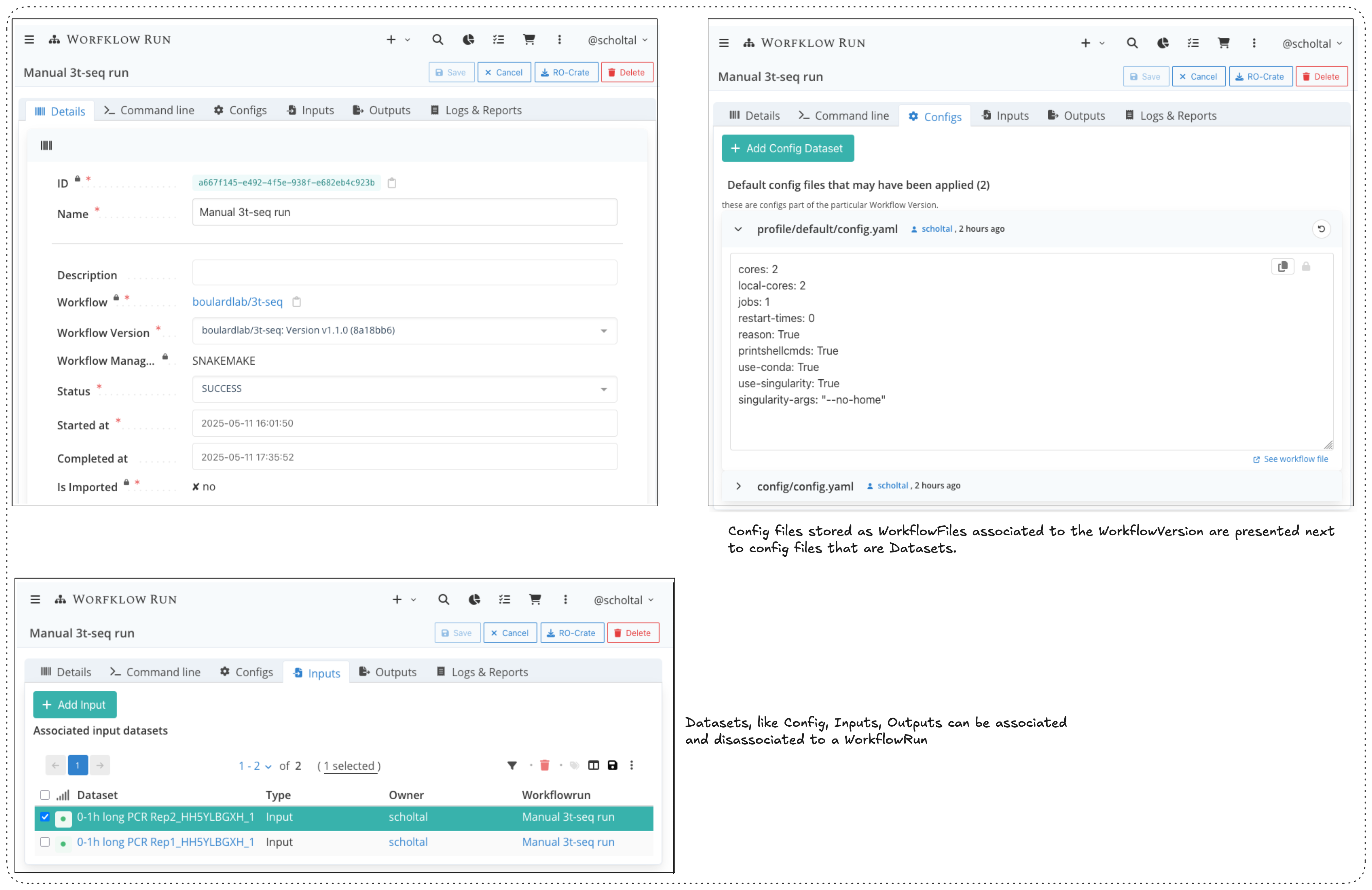
The workflow run list page offers a "New" button to create a Workflow Run using a standard web form capturing the mandatory metadata.
Figure 3: WorkflowRun UI and manual creation
Linking datasets to a workflow run
After a WorkflowRun has been created, the edit view can be entered. This page contains tabs organized by data type:
- Configs tab: Shows both WorkflowFiles marked as CONFIG type (from the WorkflowVersion) and WorkflowDatasets marked as CONFIG type (associated with the WorkflowRun)
- Input, Output, Logs & Reports tabs: Show WorkflowDatasets with the corresponding data_type (INPUT, OUTPUT, LOGS, or REPORTS)
Each WorkflowDataset has a data_type that categorizes it within the workflow execution context. Additional WorkflowDatasets can be associated or disassociated in the relevant tabs.
For technical details on the API for registering workflow runs, please refer to the developer documentation.
Exporting Workflow Run RO-Crates
LabID lets you export Workflow Runs as Workflow Run RO-Crates, which is an interoperable format to share the data and metadata associated to a workflow run.
-
Workflow runs imported as RO-Crates
If a workflow run was imported as a Workflow Run RO-Crate, the workflow run page will indicate the path of the run directory on the storage volume, which is a valid RO-Crate. You can simply copy the data from this run directory to re-export such RO-Crate. -
Other workflow runs
For workflow runs which were not imported as RO-Crates, LabID will generate a new RO-Crate. The resulting RO-Crate is by default saved to the user-dropbox.
If a user does not have a dropbox defined, LabID let you save the generated RO-Crate to a subfolder within a list of parent folders defined in the LabID server settings.